Current Articles | RSS Feed RSS Feed

Avoid the summer slide with Pixie and Wixie


Elementary students love using Pixie and Wixie for learning at school and you can keep them excited about reading, writing, thinking, and learning this summer by using them at home. Combine these tools with our free parent guides for summer learning fun.


WixieIf you use Wixie at school, your students can simply log in at home to continue creating with Wixie this summer. Be sure to share student log in information with parents before school is out. If students have iPad or Android tablets at home, they can go to the app store to download the Wixie app.


Pixie - creativity software for elementary studentsIf you use Pixie at school, parents can purchase Pixie at home for:

Find age appropriate project ideas in the Parent Guides!

Pixie Home Edition Parent GuidesThe Pixie and Wixie parent guides include specific and practical activities to engage children in learning! Activities in language arts, math, science, and social studies encourage practicing writing with the text tools, art with the paint tools, and reading and speaking with the recording tools.

http://www.tech4learning.com/home/guides


Download a flyer to share with to parents


Tech4Learning releases Wixie app for the Kindle Fire HD


Tech4Learning’s Wixie is now available for Kindle Fire HD tablets through the Amazon Appstore. The app is free for Wixie subscribers. The Wixie app for Kindle Fire HD takes advantage of authoring on the tablet’s touch interface, while connecting to storage, classroom management, and assessment tools in the cloud.

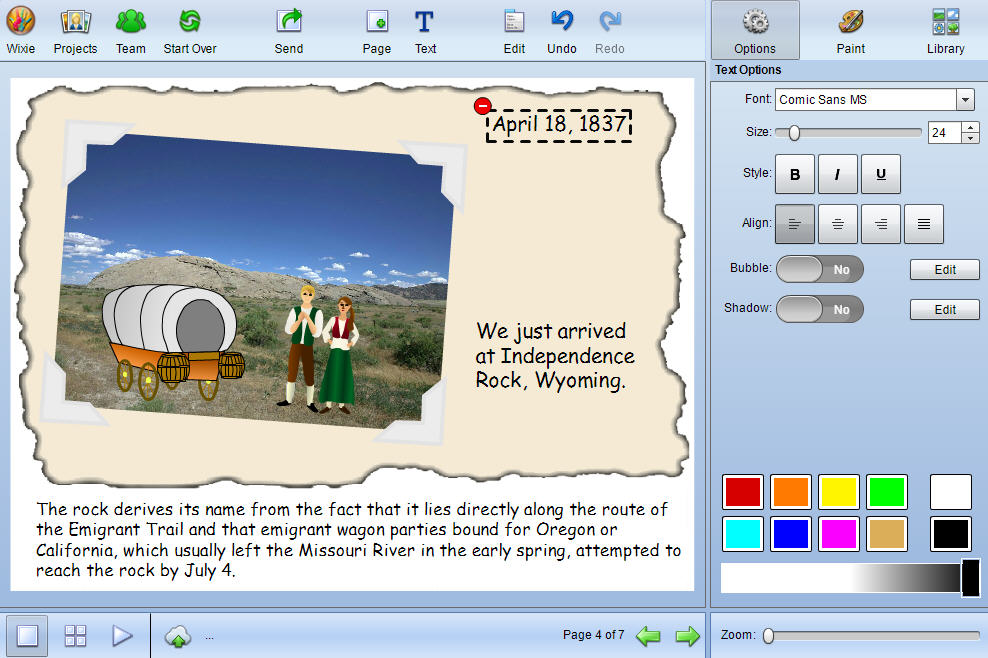
Wixie app iconWixie is an online authoring tool students can use to explore the curriculum through a combination of text, original artwork, voice narration, and images. Projects are stored in the cloud, making it easy for students to move between devices, teachers to evaluate student work, and schools to share projects with family and community.

“We are working to make Wixie available to as many users as possible. Developing an app for the Kindle Fire HD is essential to our goal of providing powerful tools and a wide audience for student work,” explains David Wagner, CEO of Tech4Learning.

“Creating and communicating ideas is essential to success in our digital age, shares Melinda Kolk, Director of Professional Learning. “From the computers at school and the local library to the tablet a family has chosen to buy, Wixie offers an opportunity for anytime, anywhere learning in which students are creating and not simply consuming information.”

Learn more about Wixie at: www.tech4learning.com/wixie.

Wixie wins 2012 Tech & Learning Award of Excellence


Award of ExcellenceTech4Learning’s Wixie wins an Award of Excellence in Tech & Learning magazine's prestigious 30-year-old recognition program that awards "innovative applications that break new ground." Over 160 entries were put to the test by Tech & Learning's experienced educational team of judges.

Wixie is an online authoring tool students can use to explore the curriculum through a combination of text, original artwork, voice narration, and images. Projects are stored in the cloud, making it easy for students to move between devices, teachers to evaluate student work, and schools to share projects with family and community.

“Because Wixie is a cloud-based product, we constantly improve the tools for students and teachers,” explains David Wagner, CEO of Tech4Learning. “Recently we have been working to ensure Wixie runs on iPads, Android tablets, Kindle Fire HDs, Chromebooks, and PCs running Windows or OSX." 

Wixie - author in the cloud“I have been a long time fan and user of Pixie and love how we can create the same projects online with Wixie,” shares Katy Hammack, a 3rd grade teacher in Santee, California. “Now our students work on assignments and digital stories on their iPads, classroom laptops, or computers at home, allowing us to enable anytime, anywhere learning.”

To learn more about Wixie, visit the Tech4Learning web site at: www.tech4learning.com/wixie

Tech4Learning releases Wixie app for Android tablets


Tech4Learning’s Wixie is now available for Android tablets through the Google Play store. The app is free for Wixie subscribers. The new Wixie app for Android takes advantage of authoring on the tablet’s touch interface, while connecting to storage, classroom management, portfolio, and assessment tools in the cloud.

WixieWixie is an authoring tool students can use to paint pictures, write stories, and record their voice to explore the curriculum and demonstrate mastery. Projects are stored in the cloud, making it easy for students to share  rojects with family and community.

“We are working to make Wixie available to as many users as possible. With the growing 1:1 initiatives that use affordable Android tablets, having an app for these devices, as well as the iPad, is essential to our goal of providing powerful tools and a wide audience for student work,” explains David Wagner, CEO of Tech4Learning.

“With a range of affordable Android tablets on the market, we are working to provide powerful tools that ensure students have an opportunity to create as well as consume information,” shares Melinda Kolk, Director of Curriculum at Tech4Learning. “Portable tablets with wireless capabilities mean students can develop powerful 21st century communication skills no matter their location.”

For more information about Wixie, visit: www.tech4learning.com/wixie 

Wixie available as an iPad app


Tech4Learning’s Wixie is now available in the Apple App store for the iPad.  The new Wixie app takes advantage of the iPad’s touch interface, while connecting to storage, classroom management, portfolio, and assessment tools in the cloud.

Wixie iPad AppWixie is an authoring tool students can use to paint pictures, write stories, and record their voice to explore the curriculum and demonstrate mastery. Projects are automatically stored in the cloud, making it easy to distribute a URL and passkey for to share Wixie projects with family and the community.

 “We are working to make Wixie available to as many users as possible. With the large number of iPads in use at home and the growing 1:1 initiatives that use iPads, having an app for this device is essential to our goal of providing powerful tools and a wide audience for student work,” explains David Wagner, CEO of Tech4Learning.

“I have been a long time fan and user of Pixie and love how we can create the same projects online with Wixie,” shares Katy Hammack, a 3rd grade teacher in Santee, California. “Now with the Wixie iPad app, students will be able to work on assignments and digital stories on their iPads, classroom laptops, or computers at home, allowing us to enable anytime, anywhere learning.”

To learn more about Wixie, visit the Tech4Learning web site at: www.tech4learning.com/wixie/ipad

Tags: , ,

Wixie selected for Google Chromebook education app packs


San Diego, California, July 2, 2012 — Wixie, Tech4Learning’s popular student creativity tool, is now available as part of Google’s Education App Packs. The newly released Education App Packs are select groups of recommended web apps for different subjects and grade levels.  These packs are available in the Google Chrome store and can be installed from the Chromebook management console.

Wixie and ChromebooksWixie is a cloud-based tool students can use to paint pictures, write stories, and record voice to explore curriculum and demonstrate mastery. Projects are stored in the cloud, making it easy to distribute a URL and passkey for to share Wixie projects with family and the community.

“The integration of educational apps on the Chromebooks provides a simple way for teachers and students to use their Wixie accounts without additional logins or passwords and the inclusion of Wixie in the Chromebook education app packs makes it even easier to deploy Wixie across a school or district,” explains David Wagner, CEO of Tech4Learning.

Users can install Wixie’s educational app through its Chrome Web Store listing: http://bit.ly/Wixie_GoogleEdPacks

Tags: ,

Wixie update lets users sign in with Google Accounts


Tech4Learning has released an update to Wixie that allows organizations to use Google Accounts for authenticating users. Wixie is a cloud-based authoring tool students can use to paint pictures, write stories, and record their voice while exploring and mastering the curriculum. Google Accounts provides a way for third-party applications to authorize users, providing an opportunity for single sign on.

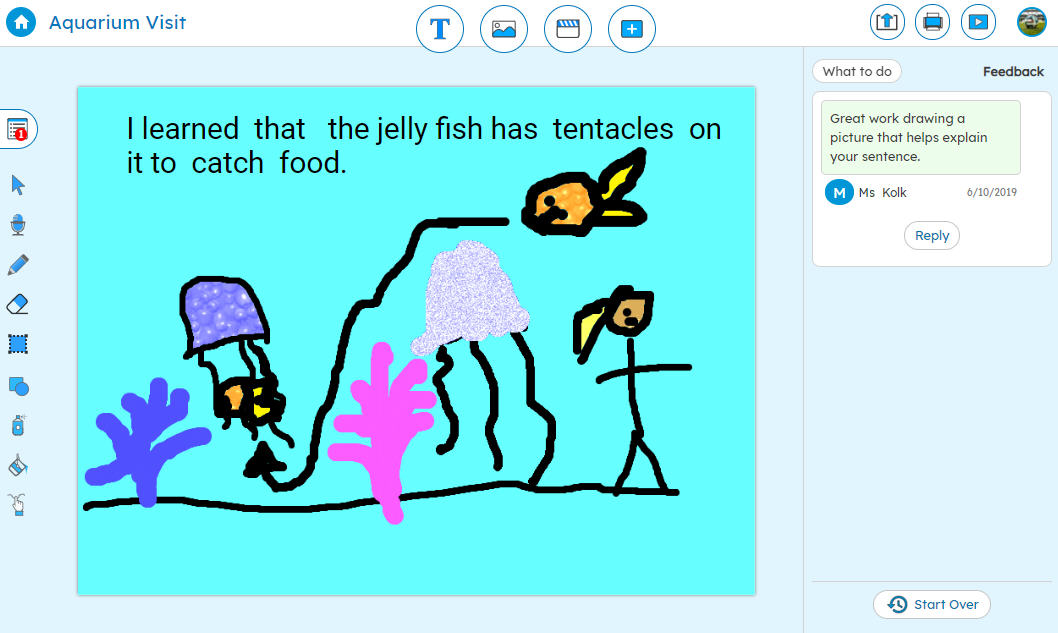
Wixie Student Project

When organizations authenticate Wixie using Google Accounts, users can log in once to Google and seamlessly access their Wixie account without having to reenter a username and password. “We are seeing a greater demand for the use of Wixie on Chromebooks and authenticating Wixie through Google Accounts students are already using gets them working in Wixie as quickly as possible,” explains David Wagner, CEO of Tech4Learning.

More and more, districts are looking to use Google Accounts to access a variety of web applications. With or without the use of Chromebooks, Google Account authentication makes it easier to manage Wixie as part of a suite of web applications in the classroom.

Tags: ,

Wixie Update Makes Student Projects Viewable on the iPad


San Diego, California, March 14, 2012 — Tech4Learning has released an update to Wixie that allows student projects to be viewed on the iPad. Wixie projects now play back in Flash, HTML 5 or HTML depending on the capabilities of the web browser viewing the project.

Wixie Activities

Wixie is a cloud-based authoring tool students can use to paint pictures, write stories, and record their voice to explore the curriculum and demonstrate mastery. Projects are automatically stored in the cloud, making it easy to distribute a URL and passkey for to share Wixie projects with family and the community.

“Students can now share their work without concern for what device will be used to view it,” shares Melinda Kolk, VP of Curriculum and Professional Development at Tech4Learning, “and now teachers can view and assess student work from their laptops or their iPads.”

“We have been working to make Wixie available to as many devices and users as possible. This is an important step in providing an wide audience for student work,” explains David Wagner, CEO of Tech4Learning.

To learn more about Wixie, visit the Tech4Learning web site at: www.tech4learning.com/wixie.

Tags: , ,

Wixie Available in Google Chrome Web Store


San Diego, California, February 14, 2012 — Tech4Learning’s Wixie is now available as an app in Google’s Chrome Web Store (https://chrome.google.com/webstore/). Wixie is a cloud-based authoring tool students can use to paint pictures, write stories, and record their voice to explore the curriculum and demonstrate mastery.

“Wixie has always worked with Chromebooks,” shares Melinda Kolk, VP of Curriculum and Professional Development at Tech4Learning, “and now that you can add Wixie as a Chrome app it is even easier for students to launch Wixie and share their ideas.”

Wixie interface“Because Wixie is a cloud-based product, we are constantly working to make it available to as many devices and users as possible. It shouldn’t matter what hardware a district can afford, but what students can create with the tools they have available.” explains David Wagner, CEO of Tech4Learning.

To find Wixie in the Chrome Web Store users simply need to search for “Wixie” and follow the instructions for adding the app.

Additional information about Wixie is available at http://tech4learning.com/wixie or by contacting Danielle Abernethy at 1-877-834-5453 ext 3345.

Wixie release integrates Common Core Standards


Tech4Learning has released an update to Wixie that makes it easy to track student progress toward achievement of Common Core Standards.  Wixie is an authoring tool students can use to paint pictures, write stories, and record their voice to explore the curriculum and demonstrate mastery.

With the update, teachers can assign activities specific to Common Core Standards and attach Common Core Standards to student projects in Wixie. Teachers can track progress towards the standards and assign activities to individual students in order to develop mastery.

“Hundreds of the activities in Wixie have been correlated to Common Core Standards,” shares Melinda Kolk, Director of Curriculum Development at Tech4Learning, “and Wixie’s new management tools make it easy for teachers and administrators to view and evaluate student work, and differentiate instruction as students progress toward mastery of these standards.”

“With the addition of the Common Core Standards, Wixie continues to evolve as a core curriculum product, instead of nice to have technology supplement,” explains David Wagner, CEO of Tech4Learning.

Because Wixie is a cloud-based product, the Common Core integration with Wixie is immediately available to all current Wixie subscribers.

More information about Wixie is available at: www.tech4learning.com/wixie or by contacting Kristen Yazbek at 8778345453.

All Posts

News from Tech4Learning including awards, updates, events, new products, and classroom success stories.

Follow Tech4Learning

Tech4Learning ConnectTech4Learning's BlogTwitterFaceBookYouTube

Subscribe via E-mail

Your email: