Posted by Melinda Kolk on Fri, May 17, 2013 @ 06:16 PM
Tech4Learning’s Pixie is now available for Android tablets through the Google Play store. Millions of students use Pixie on their computers, and now they can use Pixie on their Android tablets to create and share their ideas and explore the curriculum.
Pixie is standard creativity software on elementary computers in districts across the United States. Pixie provides tools students can use to combine text, original artwork, voice narration and images to communicate knowledge and ideas. Pixie is the perfect tool for digital age learning with built-in activities for Common Core and tools to create comics and trading cards, digital storytelling videos, and curriculum-related HTML slideshows.
“Research has shown that students using Pixie perform significantly better in Reading and Math. We want to ensure Pixie is still available to students as parents and schools migrate from PCs to tablets. With Android’s growing dominance in the worldwide tablet market, and schools moving towards 1:1 technology, the Pixie app for Android makes sure students continue to have powerful creativity tools,” explains David Wagner, CEO of Tech4Learning.

“Because the Pixie app includes the same tools, features, and interface as the desktop version, it is easy for students and teachers to simply pick up a new device and continue the work they have been doing,” shares Melinda Kolk, Director of Professional Learning for Tech4Learning. “Students have been writing, illustrating, designing, and creating in Pixie on computers at school and now they can continue working on new tablets they have at home or school.”
The Pixie app for iPad released in March 2013. To learn more about using Pixie on tablets, visit the Tech4Learning web site at: www.tech4learning.com/pixie/features_tablet
Posted by Melinda Kolk on Thu, May 16, 2013 @ 03:29 PM
Elementary students love using Pixie and Wixie for learning at school and you can keep them excited about reading, writing, thinking, and learning this summer by using them at home. Combine these tools with our free parent guides for summer learning fun.
If you use Wixie at school, your students can simply log in at home to continue creating with Wixie this summer. Be sure to share student log in information with parents before school is out. If students have iPad or Android tablets at home, they can go to the app store to download the Wixie app.
If you use Pixie at school, parents can purchase Pixie at home for:
Find age appropriate project ideas in the Parent Guides!
The Pixie and Wixie parent guides include specific and practical activities to engage children in learning! Activities in language arts, math, science, and social studies encourage practicing writing with the text tools, art with the paint tools, and reading and speaking with the recording tools.
http://www.tech4learning.com/home/guides
Download a flyer to share with to parents
Posted by Melinda Kolk on Thu, Apr 25, 2013 @ 04:06 PM
As an award-winning leader in providing 21st century tools, Tech4Learning announces the release of Share 4, software secondary students use to build media literacy as they actively engage with classroom content.
Share is authoring software that lets students combine text, graphics, movies, and animations to show mastery and understanding. Students synthesize content and communicate ideas through interactive presentations, brochures, web sites, and digital portfolios.
“Share has always let students author classroom projects,” shares Tech4Learning CEO, David Wagner. “With Share 4 they can now collaborate on projects in real-time, as well as save and publish their work in the cloud giving them a global, authentic audience.”

Laura Spencer, Coordinator of Instructional Technology for Santee School District in California explains, “It has never been easier to provide students an opportunity to create, publish, and share their creativity. Share is a must have 21st century tool!”
To learn more about Share, visit the Tech4Learning web site at: www.tech4learning.com/share.
Posted by Melinda Kolk on Tue, Apr 02, 2013 @ 10:47 AM
Tech4Learning’s Pixie is now available in the Apple App store for the iPad. Millions of students world-wide are using Pixie on their computers, and now they can use Pixie on the iPad to create and share their ideas, imagination and understanding through a combination of text, original artwork, voice narration and images.
Pixie is standard creativity software on elementary computers in districts across the United States. With built-in activities correlated to Common Core Standards, and tools to create printed booklets, comics, trading cards, digital storytelling videos, and curriculum-related HTML slideshows, Pixie is the perfect tool for the 21st century classroom.
“With so many districts moving 1:1 with iPads, as well as their growing use at home, we developed the Pixie app for iPad so students and teachers who are using this powerful learning tool on their desktop computers, can continue developing powerful communication skills with their new devices,” explains David Wagner, CEO of Tech4Learning.
“Because the Pixie app includes the same tools, features, and interface as the desktop version, it is easy for students and teachers to simply pick up a new device and continue the work they have been doing,” shares Melinda Kolk, Director of Professional Learning for Tech4Learning. “Both the Pixie app for iPad and an updated version of Pixie for PCs can read files created in the other program, making it easy to work in environments with mixed devices or move from school to home and back again.”
Learn more about Pixie and the Pixie App for iPad.
Posted by Melinda Kolk on Mon, Nov 19, 2012 @ 10:57 AM
Tech4Learning’s Wixie is now available for Kindle Fire HD tablets through the Amazon Appstore. The app is free for Wixie subscribers. The Wixie app for Kindle Fire HD takes advantage of authoring on the tablet’s touch interface, while connecting to storage, classroom management, and assessment tools in the cloud.
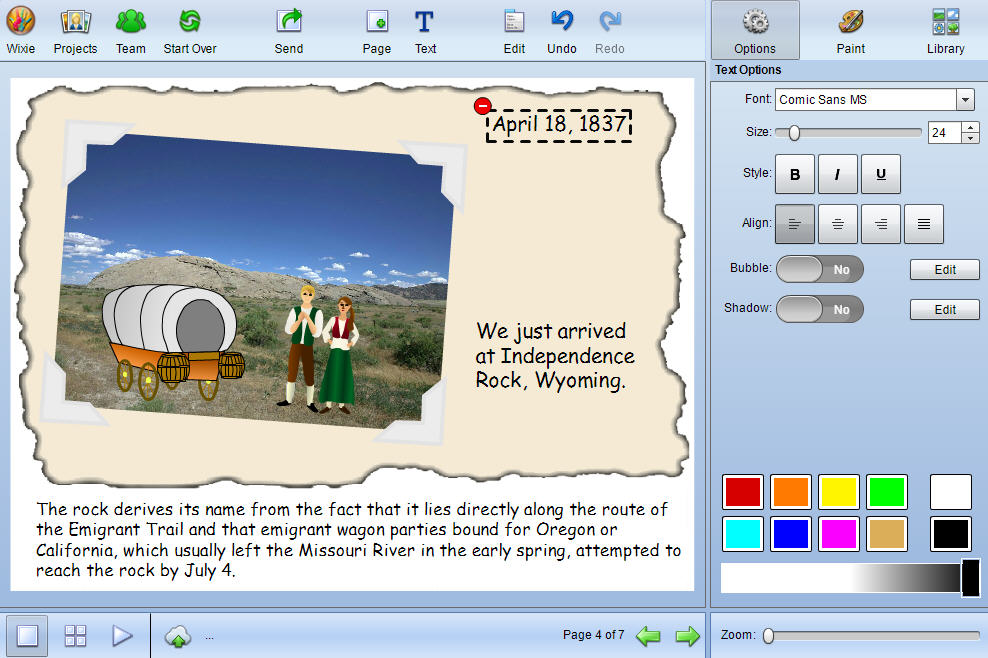
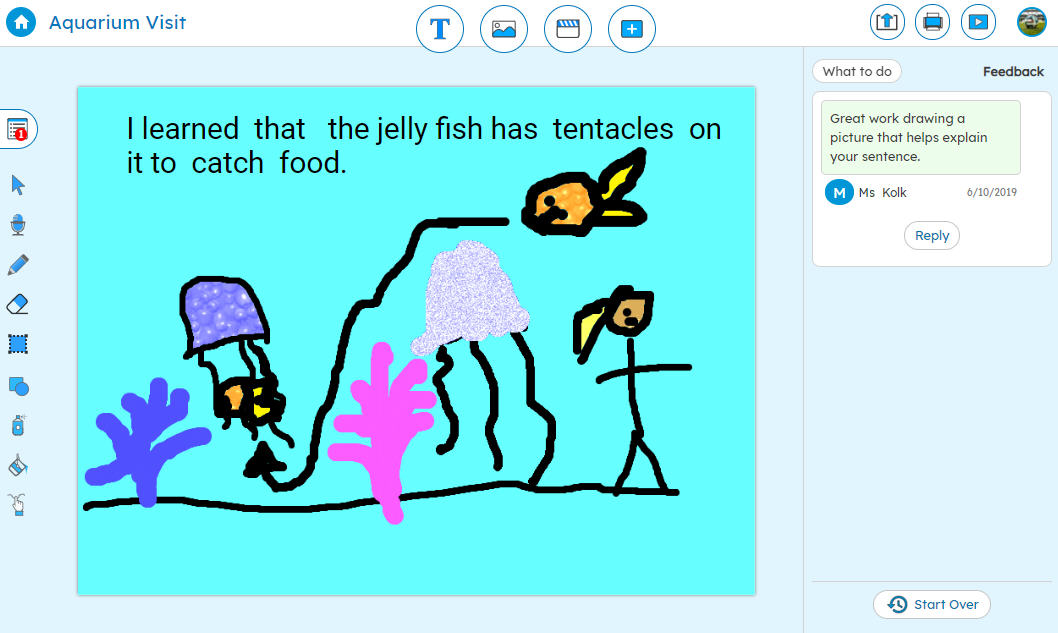
Wixie is an online authoring tool students can use to explore the curriculum through a combination of text, original artwork, voice narration, and images. Projects are stored in the cloud, making it easy for students to move between devices, teachers to evaluate student work, and schools to share projects with family and community.
“We are working to make Wixie available to as many users as possible. Developing an app for the Kindle Fire HD is essential to our goal of providing powerful tools and a wide audience for student work,” explains David Wagner, CEO of Tech4Learning.
“Creating and communicating ideas is essential to success in our digital age, shares Melinda Kolk, Director of Professional Learning. “From the computers at school and the local library to the tablet a family has chosen to buy, Wixie offers an opportunity for anytime, anywhere learning in which students are creating and not simply consuming information.”
Learn more about Wixie at: www.tech4learning.com/wixie.
Posted by Melinda Kolk on Wed, Nov 07, 2012 @ 05:46 PM
Tech4Learning’s Wixie wins an Award of Excellence in Tech & Learning magazine's prestigious 30-year-old recognition program that awards "innovative applications that break new ground." Over 160 entries were put to the test by Tech & Learning's experienced educational team of judges.
Wixie is an online authoring tool students can use to explore the curriculum through a combination of text, original artwork, voice narration, and images. Projects are stored in the cloud, making it easy for students to move between devices, teachers to evaluate student work, and schools to share projects with family and community.
“Because Wixie is a cloud-based product, we constantly improve the tools for students and teachers,” explains David Wagner, CEO of Tech4Learning. “Recently we have been working to ensure Wixie runs on iPads, Android tablets, Kindle Fire HDs, Chromebooks, and PCs running Windows or OSX."
“I have been a long time fan and user of Pixie and love how we can create the same projects online with Wixie,” shares Katy Hammack, a 3rd grade teacher in Santee, California. “Now our students work on assignments and digital stories on their iPads, classroom laptops, or computers at home, allowing us to enable anytime, anywhere learning.”
To learn more about Wixie, visit the Tech4Learning web site at: www.tech4learning.com/wixie
Posted by Melinda Kolk on Mon, Oct 15, 2012 @ 03:25 PM
Tech4Learning’s Wixie is now available for Android tablets through the Google Play store. The app is free for Wixie subscribers. The new Wixie app for Android takes advantage of authoring on the tablet’s touch interface, while connecting to storage, classroom management, portfolio, and assessment tools in the cloud.
Wixie is an authoring tool students can use to paint pictures, write stories, and record their voice to explore the curriculum and demonstrate mastery. Projects are stored in the cloud, making it easy for students to share rojects with family and community.
“We are working to make Wixie available to as many users as possible. With the growing 1:1 initiatives that use affordable Android tablets, having an app for these devices, as well as the iPad, is essential to our goal of providing powerful tools and a wide audience for student work,” explains David Wagner, CEO of Tech4Learning.
“With a range of affordable Android tablets on the market, we are working to provide powerful tools that ensure students have an opportunity to create as well as consume information,” shares Melinda Kolk, Director of Curriculum at Tech4Learning. “Portable tablets with wireless capabilities mean students can develop powerful 21st century communication skills no matter their location.”
For more information about Wixie, visit: www.tech4learning.com/wixie
Posted by Melinda Kolk on Tue, Sep 25, 2012 @ 02:38 PM
Tech4Learning’s Frames 5 animation software wins the ComputED Gazette’s EDDIE Award for Best Educational Software in the category of Multimedia Creation for Upper Elementary. The EDDIE Awards target "innovative and content-rich programs and websites that augment the classroom curriculum."
Frames makes it easy for anyone to create cartoons, stop-motion animation, claymation, and digital stories. With version 5, users can now collaborate on projects in real-time, capture images for time-lapse, path animate frame objects, easily match frame duration to audio, and much more.
“The streamlined interface, simple drawing and image capture tools, and new features like the ability to group frames and audio into scenes, make Frames 5 the perfect choice for anyone getting started with animation,” explains David Wagner, CEO of Tech4Learning.
I really appreciate the availability of the tools on the new interface,” shares Candace Appl of St. Joseph, Illinois . “The new recording and audio features make it is for my students to preview their voice, edit, connect audio with frames, and edit with ease. The new path animation options make it even faster to develop our ideas into animations!”
Frames is available to individuals on Amazon.com. Schools and educational organizations can take advantage of volume licensing through Tech4Learning.
Posted by Melinda Kolk on Tue, Aug 21, 2012 @ 11:09 AM
The Pixie Home Edition has been awarded a 2012 Seal of Approval from The National Parenting Center. The Pixie Home Edition provides an affordable ($19.95 on Amazon.com) way for students to continue the learning at home with many of the same features of the academic version of Pixie used in schools.

The review states, “Challenging, entertaining, educational and thoroughly enjoyable, [Pixie] got consistently high marks from testers every single day of this testing period.” The entire review of the Pixie Home Edition can be read on the National Parenting Center’s website: http://bit.ly/TNPC_Pixie
“With the Pixie Home Edition, children can come home and use the best educational software for kids to combine text, original artwork, voice narration, and images to share their ideas and tell stories,” shares CEO David Wagner. “We are thrilled that it has been recognized by The National Parenting Center as a quality product for kids at home.”
“Research shows Pixie improves student achievement at school, and now families can promote the same great learning through creativity at home,” explains Danielle Abernethy, parent and Curriculum Specialist at Tech4Learning.
Tech4Learning has also developed free Parent Guides that include specific Pixie activities in the areas of Language Arts, Math, Science, and Social Studies.
Read the National Parenting Center’s review of the Pixie Home Edition
Posted by Melinda Kolk on Mon, Jul 30, 2012 @ 03:10 PM
Tech4Learning’s Wixie is now available in the Apple App store for the iPad. The new Wixie app takes advantage of the iPad’s touch interface, while connecting to storage, classroom management, portfolio, and assessment tools in the cloud.
Wixie is an authoring tool students can use to paint pictures, write stories, and record their voice to explore the curriculum and demonstrate mastery. Projects are automatically stored in the cloud, making it easy to distribute a URL and passkey for to share Wixie projects with family and the community.
“We are working to make Wixie available to as many users as possible. With the large number of iPads in use at home and the growing 1:1 initiatives that use iPads, having an app for this device is essential to our goal of providing powerful tools and a wide audience for student work,” explains David Wagner, CEO of Tech4Learning.
“I have been a long time fan and user of Pixie and love how we can create the same projects online with Wixie,” shares Katy Hammack, a 3rd grade teacher in Santee, California. “Now with the Wixie iPad app, students will be able to work on assignments and digital stories on their iPads, classroom laptops, or computers at home, allowing us to enable anytime, anywhere learning.”
To learn more about Wixie, visit the Tech4Learning web site at: www.tech4learning.com/wixie/ipad.